Onboard an existing app
Point SDODS at an application repository, read what it found, and run a green suite in about five minutes.
How sdods analyze reads an application repository, what it detects and with what evidence, how
to review the proposal before anything is written, which guess you almost always have to correct,
and how to get from a clone to a passing suite in one sitting.
Every command on this page was run against a real repository: cypress-io/cypress-realworld-app — a React and Express banking app with 33 existing Cypress specs. Clone it next to your SDODS checkout and you can follow along exactly, or swap in your own app and read the same output shape.
git clone --depth 1 https://github.com/cypress-io/cypress-realworld-app.git ../cypress-realworld-appThe five minutes
projects/<slug>/.1. Analyze
sdods analyze ../cypress-realworld-appThe analyzer opens files and never writes one. The header is the summary: package manager, frameworks with a confidence score, the test-id attribute counted in the source, the authentication libraries it recognised, and the base URLs it inferred.
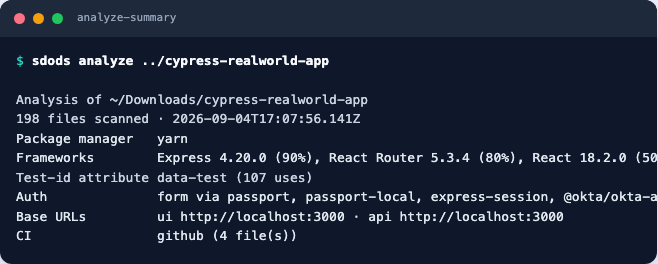
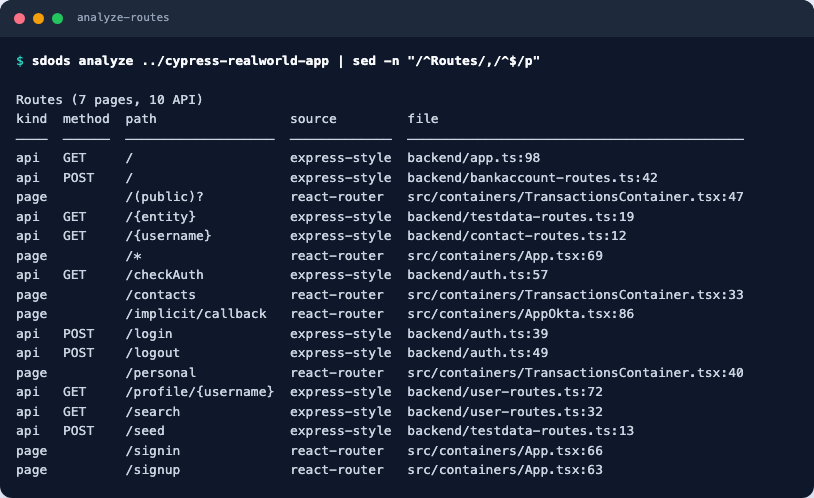
Then the route inventory, taken from the router and the server, with the file and line each one came from:
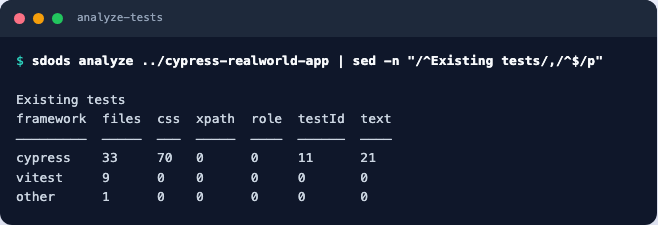
Existing tests are inventoried too, including which locator styles they use — the number that decides how much of a migration you are looking at:
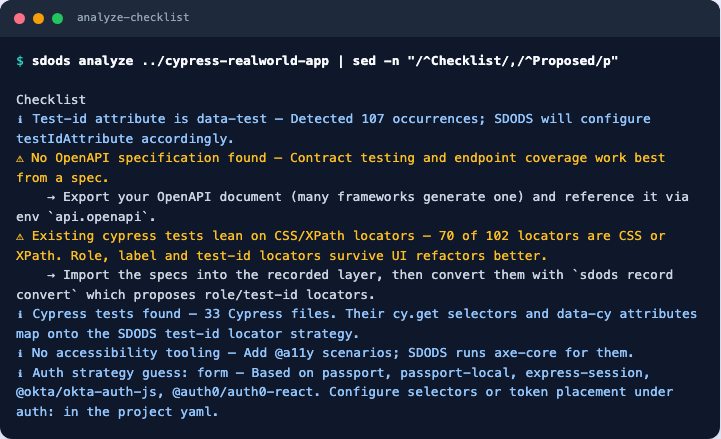
The checklist turns all of that into things to do, each with the command that does it:
--report-only skips the proposal, and the global --json flag prints the whole analysis as JSON
— the same data the report is rendered from, which is what you want in a script or an onboarding
dashboard.
2. Read the proposal
Below the analysis, analyze prints the project it would write: the slug, the layers, the
test-id attribute, the routes it will address by name, the tag taxonomy, and one module per route
group.
# Generated by `sdods analyze`. Review routes, modules and auth before committing.
slug: rwa-bank
name: RWA Bank
layers: [ui, api, hybrid]
testIdAttribute: data-test
routes:
  signin: /signin
  signup: /signup
  personal: /personal
  contacts: /contacts
tags:
  suites: [smoke, regression, sanity]
  roles: [standard, admin]
Read three things before you apply it:
| Read this | Because |
|---|---|
routes | a catch-all route (/*) or a parameterised one may need a real path to be reachable |
modules | they become your tag names and your folder names; rename them now, not after 200 tests |
envs/local | base URLs are inferred from the source and are the guess most likely to be wrong |
3. Apply
sdods analyze ../cypress-realworld-app --apply --project rwa-bank --name "RWA Bank"projects/rwa-bank/
├── sdods.project.yaml # layers, routes, modules, tags, test-id attribute
├── envs/local.yaml # base URLs, headers, user pool size
├── features/ # 14 starter features: one per route group, one per API group
│ ├── signin/signin.feature
│ └── login/login-api.feature
├── pages/HomePage.ts # a page object to grow
├── steps/ # fixtures, auth and project steps
├── data/common/users.csv # the user pool, empty of secrets
├── har/ · recorded/ # ready for `sdods har record` and `sdods record`
└── README.mdThe generated scenarios are health checks, not aspirations. A page scenario asserts the route renders; an endpoint scenario asserts the endpoint answers with a non-5xx status inside five seconds:
@ui @signin
Feature: Signin pages

  @smoke
  Scenario: The signin page loads
    Given I navigate to the "signin" page
    Then the page URL should contain "/signin"
Lint them straight away — it is instant, and it is the difference between a typo now and a red suite in ten minutes:
sdods lint -p rwa-bank
# ✔ 14 feature file(s) linted, no findings
4. Correct the guesses
Static analysis reads what the source says, and a running application sometimes disagrees. On this repository five things needed a human, and each one is a single line:
| The guess | The correction |
|---|---|
API base URL http://localhost:3000 | the backend listens on 3001; only the frontend port is obvious from .env |
Login selectors [data-test="username"] | the app spells them signin-username — and the attribute is on the Material UI wrapper, so the selector needs a trailing input |
Routes /* and /(public)? | router patterns, not addresses; delete them and their generated modules |
Route /implicit/callback | only exists when the app runs in its Okta mode |
steps/auth.ts exporting strategy: 'none' | the app has a form login: strategy: 'form' |
api:
baseUrl: http://localhost:3001 # analyze guessed 3000; the backend listens on 3001auth:
strategy: form
storageState: true
form:
loginPath: /signin
usernameSelector: '[data-test="signin-username"] input'
passwordSelector: '[data-test="signin-password"] input'
submitSelector: '[data-test="signin-submit"]'
readyUrl: /Expect exactly this kind of correction on any real application. The analyzer is deliberately literal: it reports what the files say and marks how sure it is, rather than inventing a plausible configuration you would then have to unpick.
5. First run
Start the application, then run the two layers.
# terminal 1 — the application under test
cd ../cypress-realworld-app && yarn dev

# terminal 2 — SDODS
sdods run -p rwa-bank -e local -l api                        # endpoints, no browser
sdods run -p rwa-bank -e local -l ui -b chromium -t @smoke   # pages, in chromium
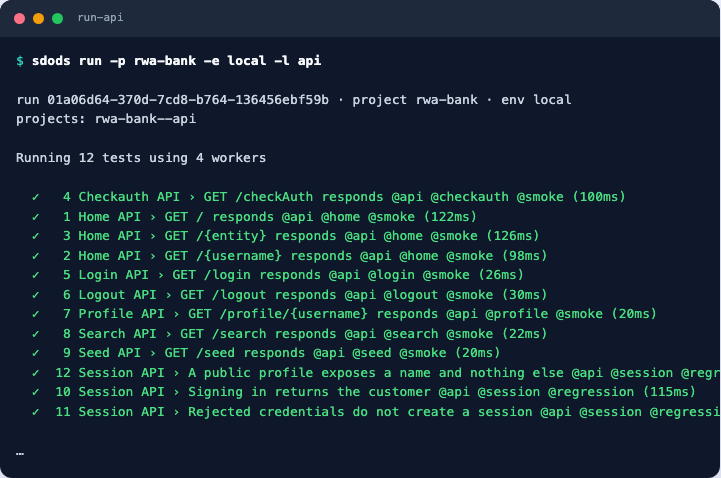
The API layer passes on the first attempt, because an endpoint either answers or it does not:
The UI layer does not, and that is the point of running it:
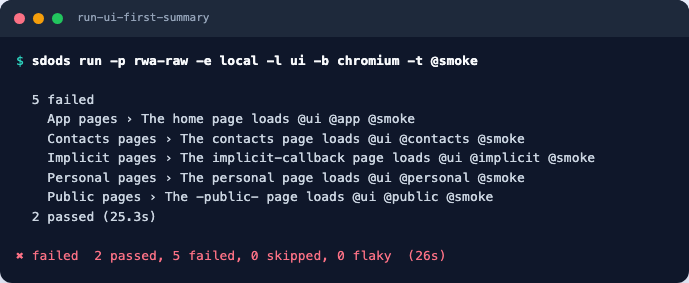
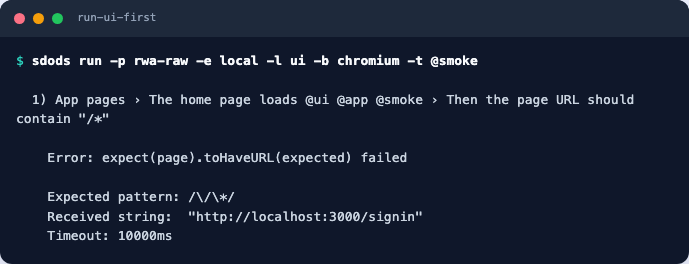
All five failures are the same failure:
Give it one. The pool users live in data/common/users.csv, auth capture signs one in once and
stores the state, and the tag @user:standard makes a scenario start from that state:
sdods auth capture -p rwa-bank -e local # → projects/rwa-bank/.auth/local/standard-0.json @smoke @user:standard
Scenario: The personal page loads
Given I navigate to the "personal" page
Then the page URL should contain "/personal"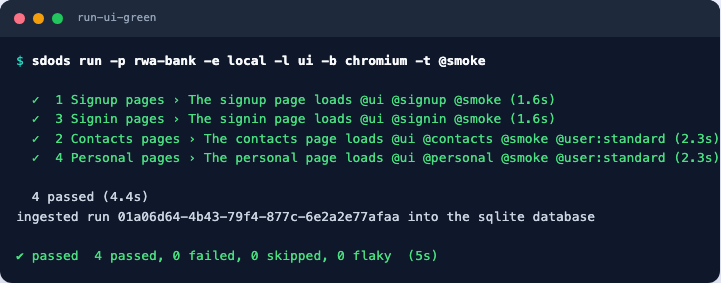
Then look at what the run recorded:
sdods report --last --open     # HTML report and the run dashboard
sdods trace --last             # the Playwright trace of any failing step
What the suite covers, and what it does not
sdods coverage -p rwa-bank --routescoverage joins the route and endpoint inventory with the scenarios you have, split by suite tag,
so the gap is a number rather than a feeling.
Coverage for rwa-bank
routes 4/4  endpoints 9/9  roles 0/2  scenarios 13  @smoke=13
Everything answers, and nothing is yet checked as a particular person: roles 0/2 is the whole
story of a freshly onboarded project.
The generated suite gets you to “everything answers”. The next three things are worth doing in
this order: a real assertion per role, @regression scenarios for the flows that make money, and
data that comes from a fixture rather than from whatever the database happens to hold.
The workshop walks all three on this same repository.
Bringing existing tests along
analyze copies existing Playwright specs into recorded/imported/ unless you pass
--no-import-specs. Cypress specs are inventoried rather than copied, because their API differs —
the migration path is to record the flow once and convert it:
sdods record -p rwa-bank -e local --url signin --name signin-flow
sdods record convert projects/rwa-bank/recorded/signin-flow.spec.ts
record convert asks your configured model adapter to turn the recording into a proposal: a
feature file plus the steps it needs, using role and test-id locators instead of the CSS chains the
old specs relied on. Nothing is applied automatically — you review it with sdods proposals list
and accept it when you agree. Without a model key, --dry-run prints the plan and
--adapter fake produces the shape. Guides → Migrating
covers the whole path.
Start from scratch instead
When there is no application to read — a service that does not exist yet, or a repository you
cannot clone — project create scaffolds the same shape by hand:
sdods project create my-app \
  --ui-url http://localhost:3000 \
  --api-url http://localhost:3000/api \
  --env local
It writes the YAML, an environment, fixtures, an authentication stub, a page object, health features and a data folder. See the project command reference.
What analyze detects
| Area | Detected |
|---|---|
| Package manager | npm, pnpm, yarn, bun; monorepo shape |
| Frontend | React, Next.js, Vue, Nuxt, Angular, Svelte, plain |
| Routes | Next.js app/ and pages/, React Router, Vue Router, Angular, Express, Fastify, NestJS, Spring, Flask, Django |
| API contracts | OpenAPI or Swagger on disk, or at the usual URLs |
| Locators | the test-id attribute in use (data-testid, data-test, data-cy, data-qa), by counting |
| Existing tests | Playwright, Cypress, Cucumber, Jest — with a breakdown of their locator styles |
| Authentication | login pages and auth libraries (passport, Auth0, Okta, Cognito, NextAuth …) |
| Environment | .env files, base URLs, Docker Compose ports, CI provider, locales, accessibility tooling |
Next steps
- The workshop — the same repository, feature by feature, in one sitting
- Projects and environments
- Your first API test