1 · Analyze and apply
Read an unknown repository, review what it proposes, write the project, and correct the guesses it could not make.
What sdods analyze can work out from an application it has never seen, how to read its evidence,
and which five things you have to decide yourself before the project is yours.
Time: 15 minutes · You need: the application cloned; it does not have to be running yet.
Look before you write
sdods analyze ../cypress-realworld-app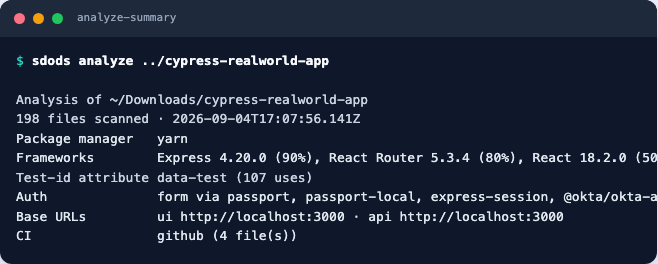
Read the checklist at the end of the report before anything else. It is the part that tells you what this repository will cost you:
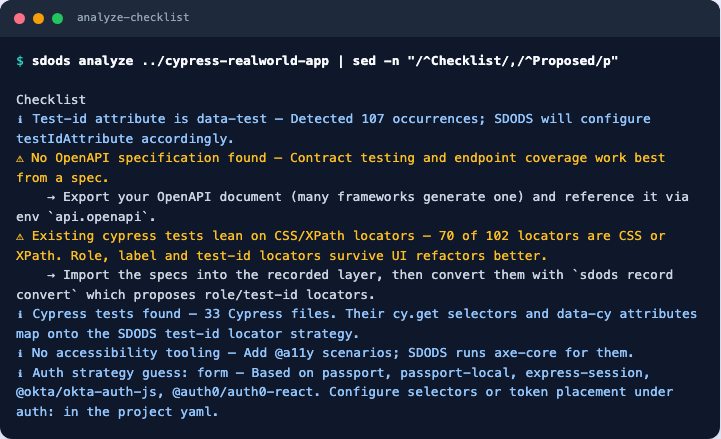
--report-only prints the analysis without the proposal. The global --json flag prints the
whole thing as JSON, which is what you want if you are onboarding twenty repositories and want a
spreadsheet at the end.
How modules are decided
The part of the proposal worth reading closely is the module list. A module is the unit you will
later lint, run and report on (sdods run --module auth), so a bad split costs you for the life of
the project.
Modules are not grouped by URL. On this repository that would give you fourteen of them, with
/login, /signin, /logout and /checkAuth as four separate modules and POST / filed under
home. Instead several signals vote and the strongest wins each route — the file that defines the
route outranks the path it serves:
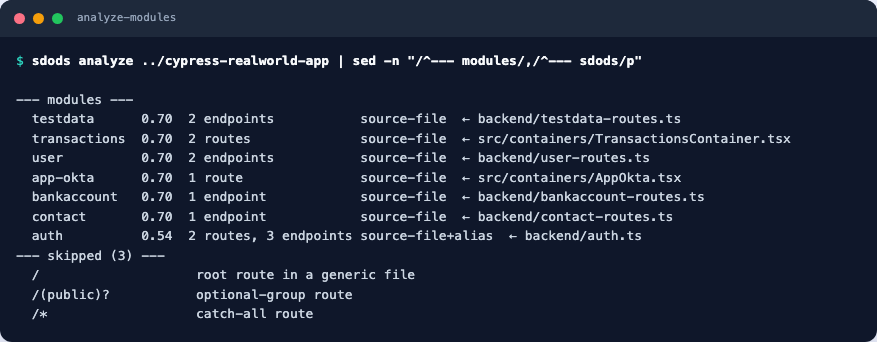
Three lines explain the whole design:
authcollected/login,/logoutand/checkAuthbecause they sharebackend/auth.ts— one file, one module, no synonym list required. The+aliason that row is the second signal pulling the React sign-in screens (/signin,/signup) into the same module, which is why it is the only row spanning both a UI and an API layer.bankaccountexists even though its route is literallyPOST /. The URL carries nothing; the filename carries everything.transactionsis a name that appears in neither of its URLs (/contacts,/personal). It comes fromTransactionsContainer.tsx— which is the domain name a person would have chosen.
The confidence column is the mean weight of the winning votes. 0.70 is the source-file signal on
its own; auth scores lower at 0.54 precisely because it merged a weaker alias vote in. A low
score is a prompt to look, not a defect.
Write the project
sdods analyze ../cypress-realworld-app --apply --project rwa-bank --name "RWA Bank"sdods lint -p rwa-bank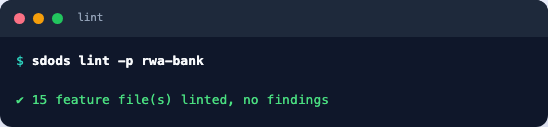
Correct the five guesses
The analyzer is literal on purpose: it reports what the files say and marks its confidence, rather than inventing a configuration you would later have to unpick. On this repository five things need a person.
The API port
.env publishes PORT=3000 for the front end and VITE_BACKEND_PORT=3001 for the API, and the
analyzer takes the obvious one for both.
api:
  baseUrl: http://localhost:3001
The sign-in selectors
It guessed [data-test="username"]. The application spells them signin-username — and puts the
attribute on the Material UI wrapper, so the selector has to reach the control inside it.
auth:
  strategy: form
  storageState: true
  form:
    loginPath: /signin
    usernameSelector: '[data-test="signin-username"] input'
    passwordSelector: '[data-test="signin-password"] input'
    submitSelector: '[data-test="signin-submit"]'
    readyUrl: /
The routes that are not addresses
React Router patterns (/*, /(public)?) and the bare root are not pages you can open, and the
analyzer now skips them itself — they are the three lines under skipped in the module table above,
and no module is created for them.
One is left for you. The Okta-only /implicit/callback is a real path, so it survives detection
and brings an app-okta module with it. This application is not configured for Okta, so delete that
module and its route, and add the real home page.
routes:
  home: /
  contacts: /contacts
  personal: /personal
  signin: /signin
  signup: /signup
The auth strategy stub
The generated steps/auth.ts exports strategy: 'none', which makes auth capture skip every
user. The application has a form login:
import { defineAuth } from '@sdods/core/auth';

export const auth = defineAuth({ strategy: 'form' });
The pool users
data/common/users.csv arrives with placeholders. The application seeds real accounts and its own
README publishes their password, so the workshop can use them as they are.
id,username,password,role,displayName
1,Heath93,${RWA_PASSWORD:-s3cret},standard,Ted Parisian
2,Arvilla_Hegmann,${RWA_PASSWORD:-s3cret},standard,Kristian Bogan
3,Dina20,${RWA_PASSWORD:-s3cret},admin,Darrel Ortiz
The ${VAR:-default} form is how every secret in SDODS is written: the file is committable, and a
real environment overrides it from .env.local.
Checkpoint
sdods lint -p rwa-bank && sdods coverage -p rwa-bank --routesYou should see no lint findings and a coverage line reading routes 4/4 endpoints 9/9 roles 0/2.
Roles being zero is correct — nothing signs in yet. That is chapter 2.
If coverage reports routes you deleted, you edited sdods.project.yaml but left the generated
features behind. Remove features/<module>/ for each module you dropped.