8 · Reports, insights and healing
Read one run, store many, and let the suite tell you which of its own tests it does not trust.
The four places a run leaves evidence, how to put runs into a database so trends exist, what the insights report is actually measuring, and how self-healing turns a broken locator into a suggested fix instead of a red build.
Time: 20 minutes · You need: chapter 7 finished.
One run
Every run writes to .sdods/runs/<id>/ and prints where:
sdods run -p rwa-bank -e local -t @regression -b chromium
sdods report --last --open      # HTML report + dashboard
sdods trace --last # the Playwright trace of a failing step| Artefact | Answers |
|---|---|
| HTML report | which scenarios ran, which failed, with the step captures |
| dashboard | the run at a glance: tags, layers, durations |
| trace | exactly what the browser did, replayable, with a timeline |
run.json | the machine-readable summary CI ingests |
Many runs
One run is an anecdote. Ingest them and the suite acquires a memory:
sdods db migrate
sdods db sync                              # projects, modules and processes into the database
sdods report ingest --run-id <run-id>      # repeat for a few runs, or wire it into CI
SQLite by default and nothing to install; DB_DRIVER=postgres with a DATABASE_URL switches the
same schema to Postgres for a shared team database.
Insights
sdods insights compute -p rwa-bank
sdods insights show -p rwa-bank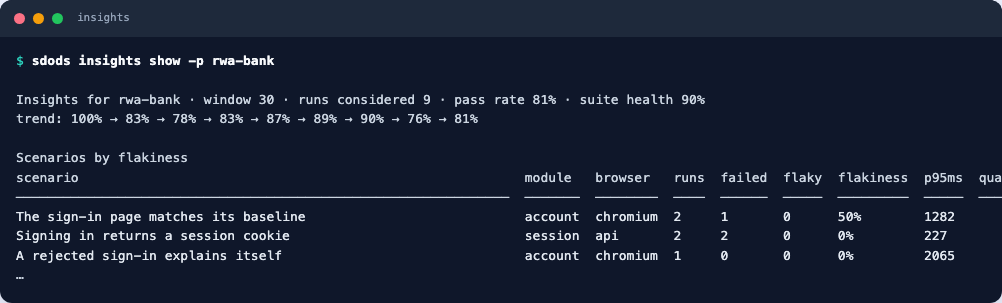
That is the point of the table: flakiness is measured, not felt. A scenario that fails and then passes without a code change is the most expensive thing in a suite, and this is the list that says which ones they are, how fragile their locators are, and which environment is least stable.
Self-healing
A locator that stops matching does not have to end the run. Give a locator context and the healer can find the element another way — and always records that it did.
Break one on purpose:
  readonly username = this.h(this.page.locator('#sidenav-username-renamed'), {
    description: 'signed-in username',
    testId: 'sidenav-username',
});sdods run -p rwa-bank -e local -l ui -b chromium -t "@regression and @account and not @visual"
sdods heal report --lastdescription original occurrences succeeded strategy suggested
────────────────── ──────────────────────────────────── ─────────── ───────── ──────── ───────────────────────────────
signed-in username locator('#sidenav-username-renamed') 1 1 testid×1 getByTestId('sidenav-username')The scenario passed, and the report names the exact replacement. Put the correct locator back.
Healing is a grace period, not a fix. A suite that heals silently for a month is a suite whose
locators no longer describe the application. Read heal report in the same pass as the run
summary, and apply what it suggests.
Assertions only heal when they go through the healed locator — this.username.expectText(...), not
expect(this.username.primary). Bypassing it opts out.
Checkpoint
sdods insights show -p rwa-bankA pass rate, a trend, and a flakiness table with real numbers in it. Next: agents and MCP.
7 · Screenshots and visual baselines
Before-and-after captures per step, a baseline that fails the first time on purpose, and the @a11y and @perf tags.
9 · Agents and MCP
Let a model read the project and propose changes you review — using a hosted model, your CLI login, or a model running on your own laptop.