5 · Data and users
Datasets instead of hard-coded values, a pool of accounts leased per worker, and login state captured once.
How to drive a scenario from a table, where test data lives, how the user pool hands each worker its own account, and why login happens once instead of once per scenario.
Time: 15 minutes · You need: chapter 4 finished.
Data files
Data lives beside the project, in whichever format suits it: CSV for tables, JSON for objects, YAML for anything a person has to read.
sdods data preview projects/rwa-bank/data/common/users.csv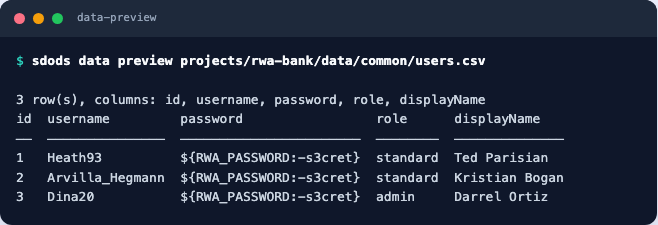
data/common/ applies to every environment; data/<env>/ overrides it for one. Nothing in either
is secret: values that must be are written as ${VAR} and resolved at run time.
Scenario outlines
The example table is the requirement, and each row becomes its own reported scenario:
  @regression
  Scenario Outline: A rejected sign-in explains itself
    Given I am on the sign-in page
    When I sign in as "<username>" with "<password>"
    Then I should see the sign-in error "<error>"

    # title-format: <username> → <error>
    Examples:
      | username   | password | error                           |
      | Heath93    | wrong    | Username or password is invalid |
      | not_a_user | s3cret   | Username or password is invalid |
For larger tables, load rows from a dataset instead of pasting them into the feature:
    Given I load dataset "users" where "role" is "admin"
    And I generate a "payment" from the factory as "payment"
The user pool
Parallel workers must not share an account — one signing out logs the other out. The pool leases a different account per worker and per role:
  @smoke @user:standard
  Scenario: The personal page loads
Given I navigate to the "personal" page @sanity
Scenario: Leasing an account inside the scenario
Given I use a leased user with role "admin"Pool size is set per environment (users.poolSize), and leases live under .sdods/leases/.
Login state, captured once
Signing in through the form in every scenario is slow and makes every test depend on the login page.
auth capture does it once and stores the browser state:
sdods auth capture -p rwa-bank -e local          # every role
sdods auth capture -p rwa-bank -e local -u admin --force
sdods auth list -p rwa-bank -e local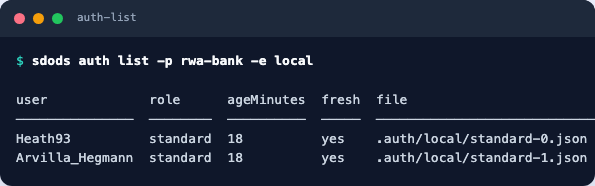
The strategy lives in steps/auth.ts and, for a form login, needs nothing but the selectors already
in sdods.project.yaml:
export const auth = defineAuth({ strategy: 'form' });Single sign-on cannot be scripted, so capture it by hand once — the state is stored the same way:
sdods auth capture -p rwa-bank -e local --interactive.auth/ holds real session state. It is gitignored for a reason: treat it like a password, and
set auth.maxAgeMinutes so stale state is refreshed rather than mysteriously failing.
Checkpoint
sdods auth list -p rwa-bank -e local && sdods run -p rwa-bank -e local -l ui -b chromium -t @smokeBoth roles show a fresh cached state, and the smoke suite passes without visiting the sign-in page. Next: record and HAR.